

PieFed has a dizzying array of settings and options that instance admins can tweak. Most of them have obvious and sensible default values but some of those have been a bit controversial, especially to do with what gets blocked by default. In this post I will explain what those are and how you can set them to your liking.
During initial setup of an instance
Initial defederations
During the initial setup process there is a series of messages printed on the screen: “Added banned instance xyz, added banned instance abc, etc” followed by “Manage banned instances at /admin/federation.” The list of initially defederated (banned) instances is:
‘anonib.al’, ‘lemmygrad.ml’, ‘gab.com’, ‘rqd2.net’, ‘exploding-heads.com’,
‘hexbear.net’, ‘hilariouschaos.com’,
‘threads.com’, ‘noauthority.social’, ‘pieville.net’, ‘links.hackliberty.org’,
‘poa.st’, ‘freespeechextremist.com’, ‘bae.st’, ‘nicecrew.digital’,
‘detroitriotcity.com’, ‘gregtech.eu’,
‘pawoo.net’, ‘shitposter.club’, ‘spinster.xyz’, ‘catgirl.life’, ‘gameliberty.club’,
‘yggdrasil.social’, ‘beefyboys.win’, ‘brighteon.social’, ‘cum.salon’, ‘wizard.casa’,
‘maga.place’, ‘lemmychan.org’
View related source code. As the message suggests, admins can go to the Federation part of the Admin area to change which instances you federate with at any time.
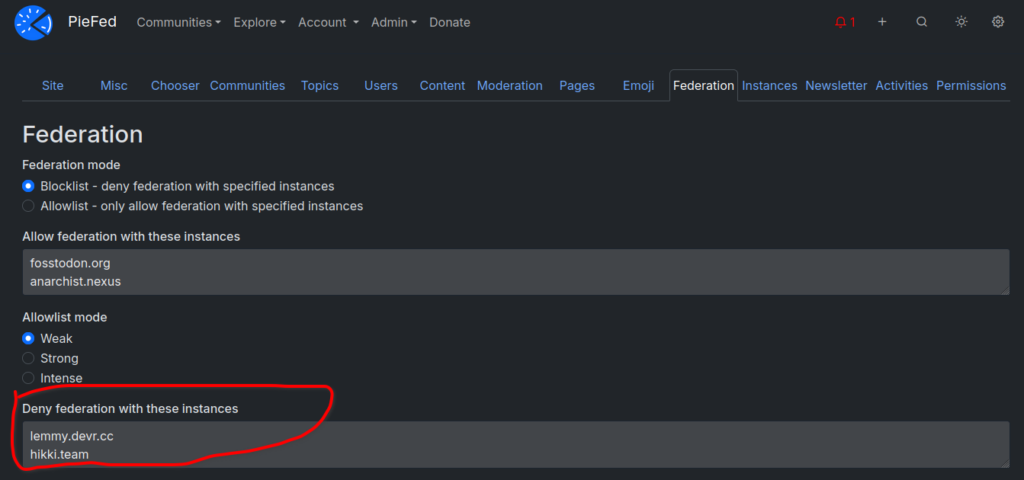
The public can see what defederations an instance has by clicking on the ‘Instances’ link in the footer of any page.
Initial domain blocks
In PieFed domain blocks are used to limit what people can link to when doing a link post.
Straight after setting up initial defederations the next message new admins see is “Added 'No-QAnon' blocklist, see https://github.com/rimu/no-qanon. This can be reversed at /domains/banned using the 'unban all' button.” The No-QAnon list is a big list of fascist and conspiracy theory websites that any self-respecting social network should have banned years ago. View source code.
After that new admins will see a message “Added 'Peertube Isolation' blocklist, see https://peertube_isolation.frama.io/. This can be reversed at /domains/banned using the 'unban all' button.” This is a list of far right PeerTube instances and the list is maintained by Framasoft, the makers of PeerTube. View source code.
To unblock one or all of these domains, click on ‘Domains’ in the footer, then on ‘Banned domains’ then the ‘Unban all’ button.
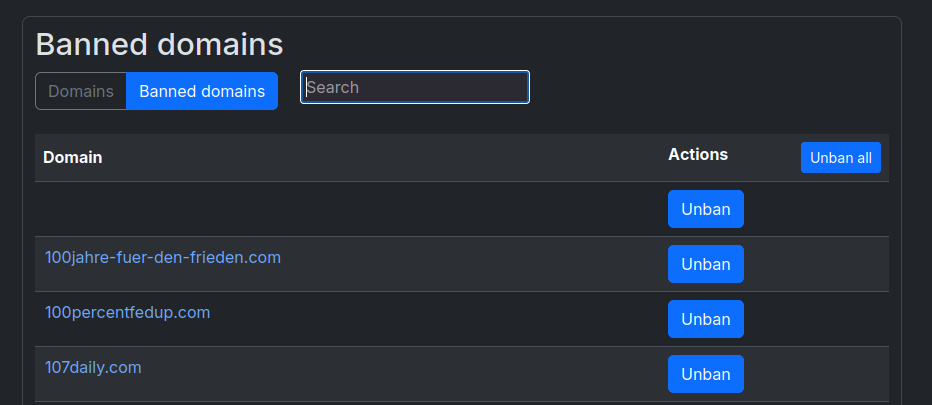
These domain blocks lists are imported once ever, during initial setup and there is no ongoing sync.
Community federation-starter tool
Initially a new PieFed instance is a very quiet place – no other instances know about it and it doesn’t know about any other instances so there’s no federation happening. Federation starts to happen when people join communities and follow other people but that can be a slow process as each community needs to be added one by one. To speed this up PieFed has a couple of different bulk community-adder tools. Here’s one of them:
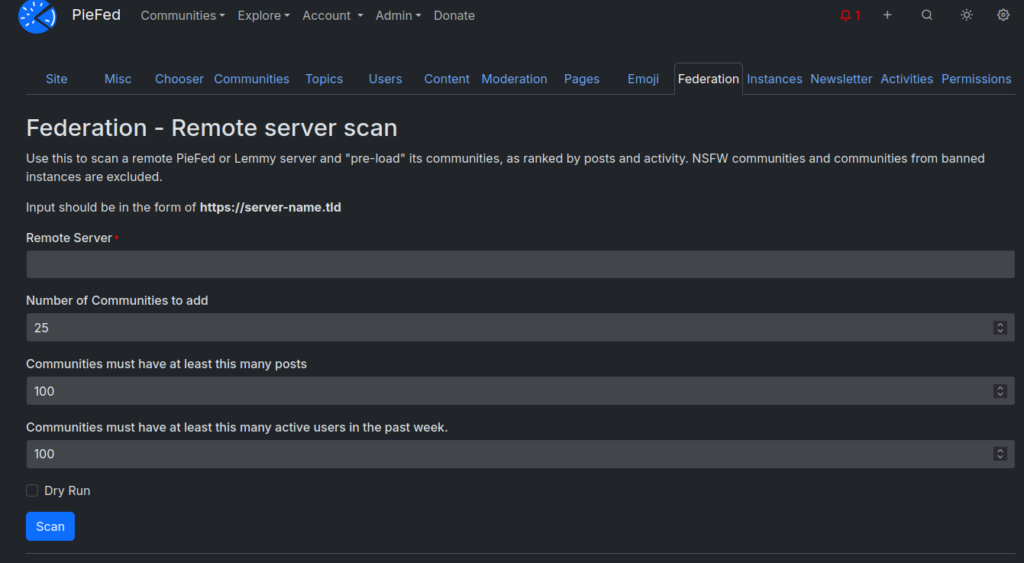
With this tool you can type in a popular threadiverse instance and then your instance will go and subscribe to all the communities on there. It’s a pretty blunt instrument and using it risks bringing in a lot of weird stuff you didn’t expect so there is a keyword filter to screen out some of the more jarring communities. The keywords are: ‘shit’, ‘piss’, ‘fuck’, ‘cunt’, ‘cocksucker’, ‘motherfucker’, ‘tits’, ‘greentext’, ‘4chan’, ‘fauxbait’. Any community with those words in it cannot be accidentally added while pulling in dozens or hundreds of others. View source code.
You can still manually add any community, including ones with those words in them (like “shitposts@piefed.world” or “4chan@sh.itjust.works”. Do this by going to the main Communities page and clicking on ‘Add remote community’. View source code.
During new user onboarding
There is a small wizard that new people go through while setting up their account and one of the questions is “How tired of Trump and Musk news are you?”. If “Please make it stop” is chosen as an answer then some keyword filters are set up which will hide all posts with the word Trump or Musk in the title. View source code.
I think this is pretty funny. But also, vital for sanity.
Instance admins can turn this off by going to Admin -> Misc and unticking the “Filter setup during onboarding” checkbox. Also after onboarding people can change the keyword filters in their settings – there’s a “Blocks & filters” area for this.
That’s all folks
As you can see, these defaults are not permanent restrictions and they are configurable. Some of the defaults are opinionated but admins can override them easily.
Software that creates a social environment inevitably makes choices about what kinds of communities it considers acceptable to expose people to. I don’t think it is responsible to make software that leaves newbie instance admins without support in making those choices and PieFed tries to provide that in a visible and configurable way.
Appreciate the transparency and just the general way Piefed works. Been really enjoying my stay here so far.